Showing posts with label cinema. Show all posts

Tuesday, 14 February 2017

Emby - SSL Setup (PART1)

I have recently setup a secure, encrypted connection to my Emby Server. This 5 Part post will explain how I did it, demonstrate 2 ways in which it can be done using a direct connection on port 443 and using a nginx reverse proxy.

Before I begin there are 2 options here. I recommend option 2 or Part.1.A below. But it requires you to purchase a Domain Name. Option 1 is free.

Part.1 - Dynamic DNS

There are many services that offer a Dynamic DNS service and most are free. If you have a static IP from your ISP then you can skip this part but if you're like me then my ISP IP address changes every time my router restarts.

I use Namecheap for a DDNS but you can also use noip, dynDNS. For the purpose of this thread I will demonstrate using No-ip.

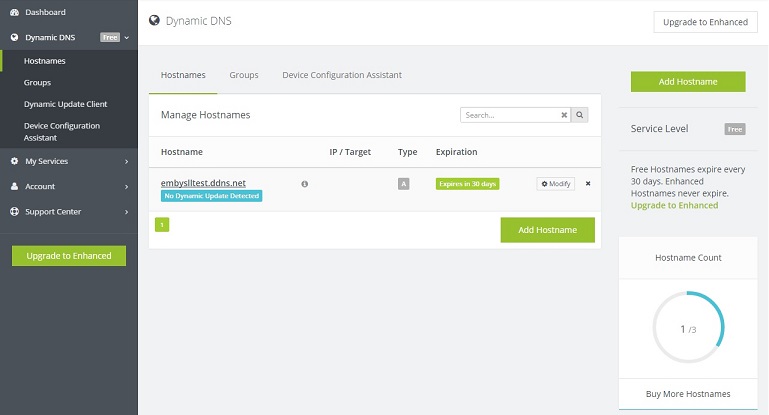
Goto noip.com and create an account.
Click on Dynamic DNS (Free) on the left hand side.
Click create a hostname.
Hostname = what ever you want your hostname to be called
Domain = what the part after your hostname will be.
i.e embySSLtest.ddns.net


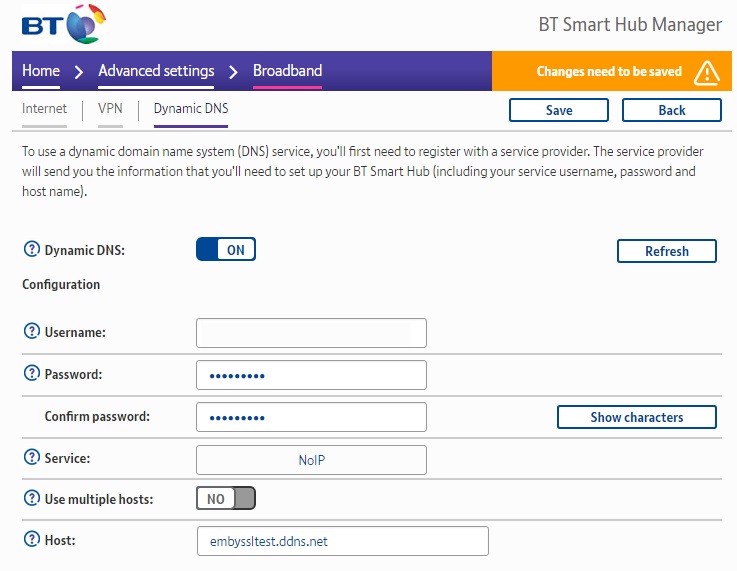
Now you need to configure how the DDNS address will get your ISP IP address. There is software available which will run constantly on your PC and check for IP updates or some routers support a DDNS services.
On my BT router under Advanced settings > Broadband > Dynamic DNS I can enter the account details we have just setup.


Once that has been done we then need to Port Forward Emby's ports on our router. For this write up we will need to forward port 443 to the Internal IP address of your Emby Server. for example 192.168.1.100
To test your DDNS you can also temporarily forward port 8096 to your emby server. Then all you have to type in the Web address bar is http://embyssltest.ddns.net:8096 and it should take you to the web app


Part 1.A. Dynamic DNS With Custom Domain Name.

Ok, so this is an extension of Part 1. Dynamic DNS. If you used Part.1 above then got a SSL Cert for your shiny new domain name and followed all the other steps. When browsing to https://emby.embyssltest.com you will connect via HTTPS however your browser will warn you that the Cert isnt trusted as it was assigned to embyssltest.com however you are browsing to embyssltest.ddns.net because of the CNAME and URL redirecting.

To fix this we need to setup your new domain name to do the Dynamic DNS'ing. Head to PART2 to find out how!

Wednesday, 10 February 2016

Roku and the NowTV

The little magical box which turns your normal TV into a smart TV. I have been using the Roku media boxes and the featureless NowTV boxes provided by sky for running the emby client around the house. Roku offers a few different boxes ranging in prices and features. Their latest version the Roku 4 offers the most features namely 4k but with the highest price tag.

Many people have been turning to the £10 NowTV boxes. They are a dumb'd down version of the Roku which also has limits on it, such as the inability to install other streaming apps such as netflix. However the NowTV has a secret, a few presses of the keys on the remote revels a developer mode. The developer mode allows you to side load applications, the only restriction is you can only side load one application at a time.

This is perfect to side load a streaming app such as Emby or Plex. My flavour is Emby and for the purposes of this post will demonstrate how to side load Emby onto the NowTV.

Pre-Reqs

Download the Emby for Roku source files from github.

Extract the zip file and the file you are looking for is called Emby.Roku.Zip


Developer Mode

On the NowTV box you now need to enable developer mode. On the remote press

Home x3, Up x2, Right, Left, Right, Left, Right

Click on Enable Installer


And Agree to the terms. Make a note of the IP Address provided as you will need this for the next step.

Installation 

Head over to your PC or Laptop and open up a web browser. In the address bar enter the IP address from the previous step. If done correctly you will be presented with Development Application Installer.


Click on Choose File and look for the Emby.Roku.Zip that you extracted from the github repo. Then click on install and wait a few seconds.

Once the installer has finished you will see a message that says Install Success in red text.


And that's it. you have now successfully side loaded Emby onto the NowTV box. One draw back of side loaded apps is that they aren't updated automatically, so if a newer version is released then you will have to side load the app again. 

A very cheap and easy way to add an Emby client to another room in the house. I current run 3 of these boxes in various rooms and all perform extremely well.