Carrying on from Part 1 of setting up Emby with a secure encrypted connection. This post will demonstrate how to get and setup a custom domain name.
Part.2 - Getting a Domain Name.
Getting a personal domain name not only looks better but makes getting a SSL cert much easier. There are plenty of registrars out there, goDaddy, crazydomains, 123.reg, namecheap etc.
For the purpose of this write up i will use namecheap.
Create an account with namecheap.com and login.
Click Domains at the top and registration.
Now type in the search box what you want your personal domain to be called. i.e. embyssltest.com
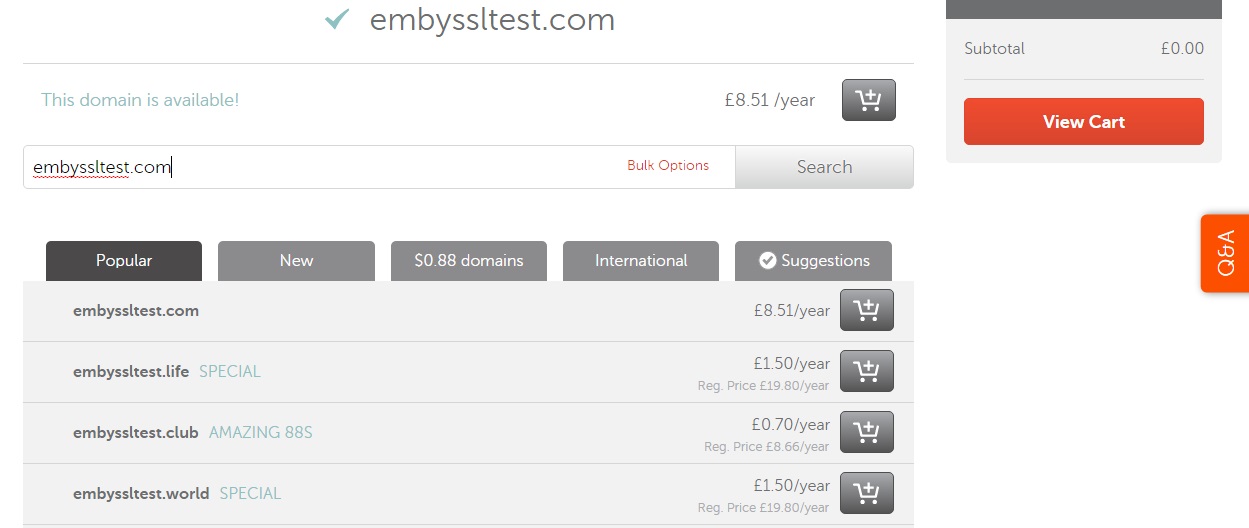
once you have decided on your name and bought it you need to set it up so that your new domain name knows where your emby server is. We do that by setting up a record to tell embyssltest.com to point to embyssltest.ddns.net that we set up earlier.
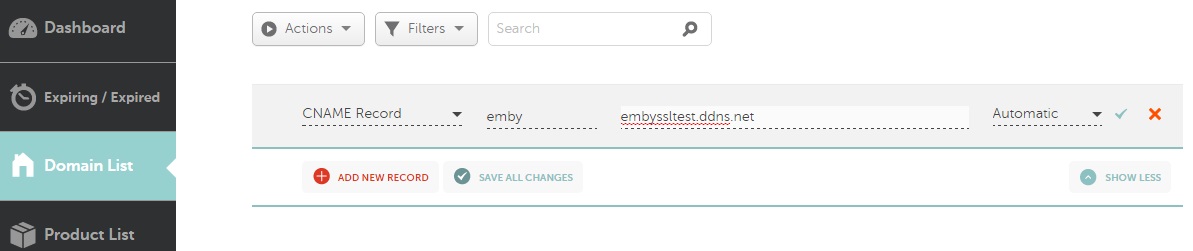
On namecheap head to Advanced DNS
Under host records - click add new record
Select CNAME.
host = emby
value = embyssltest.ddns.net (change it to your DDNS)
TTL = Automatic
now we should have emby.embyssltest.com which forwards to embyssltest.ddns.net
Optional (using a Custom domain name to do the Dynamic DNS'ing)
Head over to namecheap.com
Create an account or login to your existing account.
Go to Advanced DNS
Scroll to the bottom where is says Dynamic DNS and turn it on.
Create a A+ Dynamic DNS record.
Host = a subdomain for example DNS
Value = 127.0.0.1 (this doesnt really matter as it will be dynamically updated)
TTL = Automatic
should look list dns.embyssltest.com
We also need to create (or edit the CNAME if you created it above for emby.)
Under the Host Records
Add new host record.
Host = emby
Value = DNS.embyssltest.com
TTL = automatic
We now need to find a way to update the NameCheap DDNS. Some routers will support this (follow Part.1 but substitute no-ip for the namecheap details) however if your router is like mine and doesnt support namecheap ddns then you need to download software to do this. Namecheap offer their own client.
Unzip it and enter your details for namecheap.
Once running it will update the 127.0.0.1 entry above with your external IP.
Hope your still with me. only a few more things to setup!
Showing posts with label emby. Show all posts
Tuesday, 14 February 2017
Emby - SSL Setup (PART1)
I have recently setup a secure, encrypted connection to my Emby Server. This 5 Part post will explain how I did it, demonstrate 2 ways in which it can be done using a direct connection on port 443 and using a nginx reverse proxy.
Before I begin there are 2 options here. I recommend option 2 or Part.1.A below. But it requires you to purchase a Domain Name. Option 1 is free.
Part.1 - Dynamic DNS
There are many services that offer a Dynamic DNS service and most are free. If you have a static IP from your ISP then you can skip this part but if you're like me then my ISP IP address changes every time my router restarts.
I use Namecheap for a DDNS but you can also use noip, dynDNS. For the purpose of this thread I will demonstrate using No-ip.
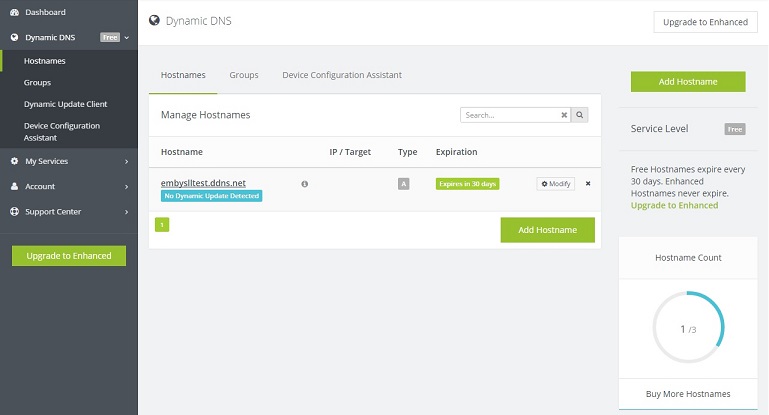
Goto noip.com and create an account.
Click on Dynamic DNS (Free) on the left hand side.
Click create a hostname.
Hostname = what ever you want your hostname to be called
Domain = what the part after your hostname will be.
i.e embySSLtest.ddns.net
Now you need to configure how the DDNS address will get your ISP IP address. There is software available which will run constantly on your PC and check for IP updates or some routers support a DDNS services.
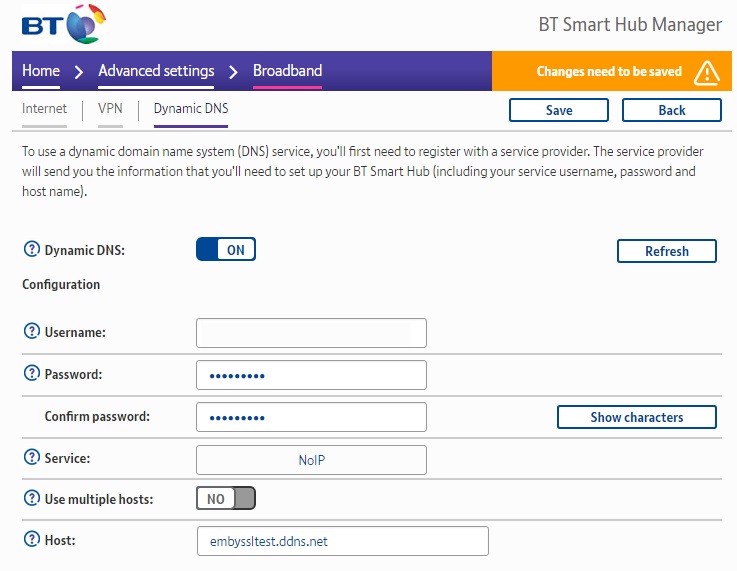
On my BT router under Advanced settings > Broadband > Dynamic DNS I can enter the account details we have just setup.
Once that has been done we then need to Port Forward Emby's ports on our router. For this write up we will need to forward port 443 to the Internal IP address of your Emby Server. for example 192.168.1.100
To test your DDNS you can also temporarily forward port 8096 to your emby server. Then all you have to type in the Web address bar is http://embyssltest.ddns.net:8096 and it should take you to the web app
Part 1.A. Dynamic DNS With Custom Domain Name.
Ok, so this is an extension of Part 1. Dynamic DNS. If you used Part.1 above then got a SSL Cert for your shiny new domain name and followed all the other steps. When browsing to https://emby.embyssltest.com you will connect via HTTPS however your browser will warn you that the Cert isnt trusted as it was assigned to embyssltest.com however you are browsing to embyssltest.ddns.net because of the CNAME and URL redirecting.
To fix this we need to setup your new domain name to do the Dynamic DNS'ing. Head to PART2 to find out how!
Before I begin there are 2 options here. I recommend option 2 or Part.1.A below. But it requires you to purchase a Domain Name. Option 1 is free.
Part.1 - Dynamic DNS
There are many services that offer a Dynamic DNS service and most are free. If you have a static IP from your ISP then you can skip this part but if you're like me then my ISP IP address changes every time my router restarts.
I use Namecheap for a DDNS but you can also use noip, dynDNS. For the purpose of this thread I will demonstrate using No-ip.
Goto noip.com and create an account.
Click on Dynamic DNS (Free) on the left hand side.
Click create a hostname.
Hostname = what ever you want your hostname to be called
Domain = what the part after your hostname will be.
i.e embySSLtest.ddns.net
Now you need to configure how the DDNS address will get your ISP IP address. There is software available which will run constantly on your PC and check for IP updates or some routers support a DDNS services.
On my BT router under Advanced settings > Broadband > Dynamic DNS I can enter the account details we have just setup.
Once that has been done we then need to Port Forward Emby's ports on our router. For this write up we will need to forward port 443 to the Internal IP address of your Emby Server. for example 192.168.1.100
To test your DDNS you can also temporarily forward port 8096 to your emby server. Then all you have to type in the Web address bar is http://embyssltest.ddns.net:8096 and it should take you to the web app
Part 1.A. Dynamic DNS With Custom Domain Name.
Ok, so this is an extension of Part 1. Dynamic DNS. If you used Part.1 above then got a SSL Cert for your shiny new domain name and followed all the other steps. When browsing to https://emby.embyssltest.com you will connect via HTTPS however your browser will warn you that the Cert isnt trusted as it was assigned to embyssltest.com however you are browsing to embyssltest.ddns.net because of the CNAME and URL redirecting.
To fix this we need to setup your new domain name to do the Dynamic DNS'ing. Head to PART2 to find out how!
Labels:
443,
blogger,
cinema,
computer,
custom,
DIY,
dynamic dns,
emby,
https,
media browser,
nginx,
plex,
port443,
reverse proxy,
ssl
Wednesday, 10 February 2016
Roku and the NowTV
The little magical box which turns your normal TV into a smart TV. I have been using the Roku media boxes and the featureless NowTV boxes provided by sky for running the emby client around the house. Roku offers a few different boxes ranging in prices and features. Their latest version the Roku 4 offers the most features namely 4k but with the highest price tag.
Many people have been turning to the £10 NowTV boxes. They are a dumb'd down version of the Roku which also has limits on it, such as the inability to install other streaming apps such as netflix. However the NowTV has a secret, a few presses of the keys on the remote revels a developer mode. The developer mode allows you to side load applications, the only restriction is you can only side load one application at a time.
This is perfect to side load a streaming app such as Emby or Plex. My flavour is Emby and for the purposes of this post will demonstrate how to side load Emby onto the NowTV.
Pre-Reqs
Download the Emby for Roku source files from github.
Extract the zip file and the file you are looking for is called Emby.Roku.Zip
Developer Mode
On the NowTV box you now need to enable developer mode. On the remote press
Home x3, Up x2, Right, Left, Right, Left, Right
Click on Enable Installer
Many people have been turning to the £10 NowTV boxes. They are a dumb'd down version of the Roku which also has limits on it, such as the inability to install other streaming apps such as netflix. However the NowTV has a secret, a few presses of the keys on the remote revels a developer mode. The developer mode allows you to side load applications, the only restriction is you can only side load one application at a time.
This is perfect to side load a streaming app such as Emby or Plex. My flavour is Emby and for the purposes of this post will demonstrate how to side load Emby onto the NowTV.
Pre-Reqs
Download the Emby for Roku source files from github.
Extract the zip file and the file you are looking for is called Emby.Roku.Zip
Developer Mode
On the NowTV box you now need to enable developer mode. On the remote press
Home x3, Up x2, Right, Left, Right, Left, Right
Click on Enable Installer
And Agree to the terms. Make a note of the IP Address provided as you will need this for the next step.
Installation
Head over to your PC or Laptop and open up a web browser. In the address bar enter the IP address from the previous step. If done correctly you will be presented with Development Application Installer.
Click on Choose File and look for the Emby.Roku.Zip that you extracted from the github repo. Then click on install and wait a few seconds.
Once the installer has finished you will see a message that says Install Success in red text.
And that's it. you have now successfully side loaded Emby onto the NowTV box. One draw back of side loaded apps is that they aren't updated automatically, so if a newer version is released then you will have to side load the app again.
A very cheap and easy way to add an Emby client to another room in the house. I current run 3 of these boxes in various rooms and all perform extremely well.
Friday, 28 August 2015
Disaster, Problems and Toys.
It's been a crazy week. As I mentioned previously my Calcium reactor sprung a leak, I've been attempting to fix it by repairing the pump with silicone until I can sort a permanent fix. This sort of worked, looks like its sealed for now but it rattles worse than a kids rattle. Also while I was on the case of the Calcium reactor I also purchased an adapter ring from JBL called U-M which allows me to use my solenoid with fire extinguisher CO2 bottles. This means I can use a 2kg cylinder which is cheap as chips to refill. So that was the problem.
The disaster, while doing some maintenance within the tank I managed to knock my LED light unit into the tank!!! One corner of the unit was submerged, luckily at the time the unit was unplugged. So after a mad panic which involved a air compressor, hair dryer and RO water to clean the electrics I decided to leave the unit to dry out over night. Next morning I plugged it in to find the controller, LCD screen and one channel of LEDs not working. ahhhhh. Panic mode, pricing up new light units. 24 hours later I managed to price up replacement parts and someone to repair it. Before sending the unit off I decided to create a new support for the light when over the tank, the support raises the height of the light, is strong and allows me to slide the unit backwards so that I can still access the tank. Once finished I test fitted the light and as a last measure I tested the light again, and would you believe it but its now fully working. Not sure how long it will last but panic mode is on hold for now.
Toys. On a rather brighter note, I've received some new equipment and additives for the tank. First up I managed to source a Maxspect Gyre 130, which also included every accessory under the sun for it. I've only just set the Gyre up and so far so good, it moves a huge amount of water in a linear line which is fantastic at keeping detritus and food in suspension. Plan is to run it in pulse mode majority of the time and in alternative gyre mode a few hours a day to mix it up. I will report back in a few days.
Additives. So I wasnt happy with the way my corals looked and decided to try NSW but also dose Red Sea Reef Colour ABCD along with AminoAcids and TraceHard. My dose scheme at the moment is 10ml of Aminoacids and TraceHard a week and 2ml every other day of the Red Sea ABCD. So far the aminoacids have made my SPS polyps extend like crazy.
The disaster, while doing some maintenance within the tank I managed to knock my LED light unit into the tank!!! One corner of the unit was submerged, luckily at the time the unit was unplugged. So after a mad panic which involved a air compressor, hair dryer and RO water to clean the electrics I decided to leave the unit to dry out over night. Next morning I plugged it in to find the controller, LCD screen and one channel of LEDs not working. ahhhhh. Panic mode, pricing up new light units. 24 hours later I managed to price up replacement parts and someone to repair it. Before sending the unit off I decided to create a new support for the light when over the tank, the support raises the height of the light, is strong and allows me to slide the unit backwards so that I can still access the tank. Once finished I test fitted the light and as a last measure I tested the light again, and would you believe it but its now fully working. Not sure how long it will last but panic mode is on hold for now.
Toys. On a rather brighter note, I've received some new equipment and additives for the tank. First up I managed to source a Maxspect Gyre 130, which also included every accessory under the sun for it. I've only just set the Gyre up and so far so good, it moves a huge amount of water in a linear line which is fantastic at keeping detritus and food in suspension. Plan is to run it in pulse mode majority of the time and in alternative gyre mode a few hours a day to mix it up. I will report back in a few days.
Additives. So I wasnt happy with the way my corals looked and decided to try NSW but also dose Red Sea Reef Colour ABCD along with AminoAcids and TraceHard. My dose scheme at the moment is 10ml of Aminoacids and TraceHard a week and 2ml every other day of the Red Sea ABCD. So far the aminoacids have made my SPS polyps extend like crazy.
Friday, 24 July 2015
emby the new MB3
Emby the powerful home media application formerly known as Media Browser or MB3. You may have heard me or read my blog posts regarding Media Browser and how highly I rate it. The popular alternative to plex has undergone a name change, something sorter and trendier than the previous name. It was received with mixed reviews however I personally like the new name, its catchy short and keeps to its origins (say M B - emby). Along with the new name has come a new logo and again it suits the name perfectly and hopefully one day it will be as recognisable as leading brands.
So why am I blogging this? Well mainly to give you an update of what's happened to my favourite media application but also to inform people how the team at emby are progressing. Recently there's been a major server update which has seen a host of changes (screenshot 1). Along with the back end the web client has seen some minor improvements and bug fixes. The biggest changes are to the Kodi and Roku apps, both seen huge performance improvements and style improvements. Other apps such as the Windows mobile and Android have also followed suit. One of the biggest let downs at the moment is the iOS app. The previous iOS app was developed by some one not affiliated to emby so unfortunately hasn't seen any new updates, however the emby team have assured the community that they are working hard on their own iOS app which will be released in the near future, something I cant wait to see.
![]() |
![]() |
Subscribe to:
Posts (Atom)