Carrying on from Part 1 of setting up Emby with a secure encrypted connection. This post will demonstrate how to get and setup a custom domain name.
Part.2 - Getting a Domain Name.
Getting a personal domain name not only looks better but makes getting a SSL cert much easier. There are plenty of registrars out there, goDaddy, crazydomains, 123.reg, namecheap etc.
For the purpose of this write up i will use namecheap.
Create an account with namecheap.com and login.
Click Domains at the top and registration.
Now type in the search box what you want your personal domain to be called. i.e. embyssltest.com
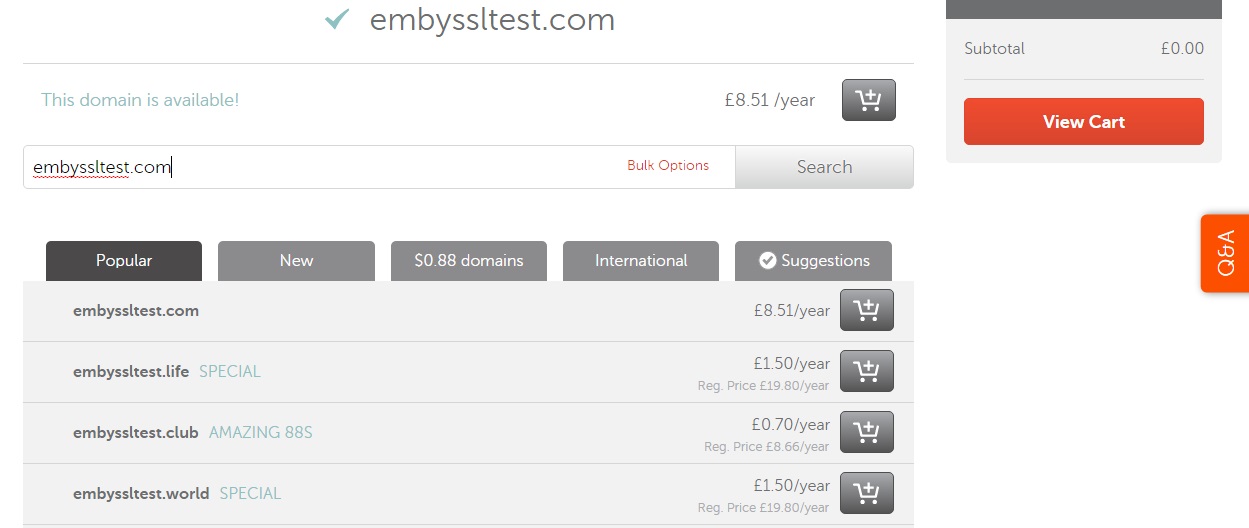
once you have decided on your name and bought it you need to set it up so that your new domain name knows where your emby server is. We do that by setting up a record to tell embyssltest.com to point to embyssltest.ddns.net that we set up earlier.
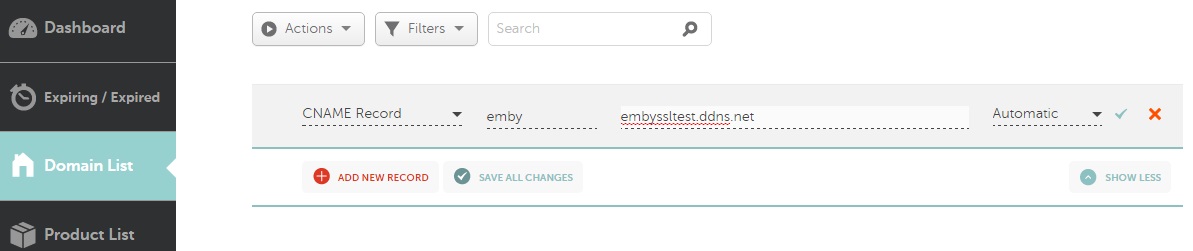
On namecheap head to Advanced DNS
Under host records - click add new record
Select CNAME.
host = emby
value = embyssltest.ddns.net (change it to your DDNS)
TTL = Automatic
now we should have emby.embyssltest.com which forwards to embyssltest.ddns.net
Optional (using a Custom domain name to do the Dynamic DNS'ing)
Head over to namecheap.com
Create an account or login to your existing account.
Go to Advanced DNS
Scroll to the bottom where is says Dynamic DNS and turn it on.
Create a A+ Dynamic DNS record.
Host = a subdomain for example DNS
Value = 127.0.0.1 (this doesnt really matter as it will be dynamically updated)
TTL = Automatic
should look list dns.embyssltest.com
We also need to create (or edit the CNAME if you created it above for emby.)
Under the Host Records
Add new host record.
Host = emby
Value = DNS.embyssltest.com
TTL = automatic
We now need to find a way to update the NameCheap DDNS. Some routers will support this (follow Part.1 but substitute no-ip for the namecheap details) however if your router is like mine and doesnt support namecheap ddns then you need to download software to do this. Namecheap offer their own client.
Unzip it and enter your details for namecheap.
Once running it will update the 127.0.0.1 entry above with your external IP.
Hope your still with me. only a few more things to setup!
Showing posts with label media. Show all posts
Tuesday, 14 February 2017
Wednesday, 10 February 2016
Roku and the NowTV
The little magical box which turns your normal TV into a smart TV. I have been using the Roku media boxes and the featureless NowTV boxes provided by sky for running the emby client around the house. Roku offers a few different boxes ranging in prices and features. Their latest version the Roku 4 offers the most features namely 4k but with the highest price tag.
Many people have been turning to the £10 NowTV boxes. They are a dumb'd down version of the Roku which also has limits on it, such as the inability to install other streaming apps such as netflix. However the NowTV has a secret, a few presses of the keys on the remote revels a developer mode. The developer mode allows you to side load applications, the only restriction is you can only side load one application at a time.
This is perfect to side load a streaming app such as Emby or Plex. My flavour is Emby and for the purposes of this post will demonstrate how to side load Emby onto the NowTV.
Pre-Reqs
Download the Emby for Roku source files from github.
Extract the zip file and the file you are looking for is called Emby.Roku.Zip
Developer Mode
On the NowTV box you now need to enable developer mode. On the remote press
Home x3, Up x2, Right, Left, Right, Left, Right
Click on Enable Installer
Many people have been turning to the £10 NowTV boxes. They are a dumb'd down version of the Roku which also has limits on it, such as the inability to install other streaming apps such as netflix. However the NowTV has a secret, a few presses of the keys on the remote revels a developer mode. The developer mode allows you to side load applications, the only restriction is you can only side load one application at a time.
This is perfect to side load a streaming app such as Emby or Plex. My flavour is Emby and for the purposes of this post will demonstrate how to side load Emby onto the NowTV.
Pre-Reqs
Download the Emby for Roku source files from github.
Extract the zip file and the file you are looking for is called Emby.Roku.Zip
Developer Mode
On the NowTV box you now need to enable developer mode. On the remote press
Home x3, Up x2, Right, Left, Right, Left, Right
Click on Enable Installer
And Agree to the terms. Make a note of the IP Address provided as you will need this for the next step.
Installation
Head over to your PC or Laptop and open up a web browser. In the address bar enter the IP address from the previous step. If done correctly you will be presented with Development Application Installer.
Click on Choose File and look for the Emby.Roku.Zip that you extracted from the github repo. Then click on install and wait a few seconds.
Once the installer has finished you will see a message that says Install Success in red text.
And that's it. you have now successfully side loaded Emby onto the NowTV box. One draw back of side loaded apps is that they aren't updated automatically, so if a newer version is released then you will have to side load the app again.
A very cheap and easy way to add an Emby client to another room in the house. I current run 3 of these boxes in various rooms and all perform extremely well.
Friday, 24 July 2015
emby the new MB3
Emby the powerful home media application formerly known as Media Browser or MB3. You may have heard me or read my blog posts regarding Media Browser and how highly I rate it. The popular alternative to plex has undergone a name change, something sorter and trendier than the previous name. It was received with mixed reviews however I personally like the new name, its catchy short and keeps to its origins (say M B - emby). Along with the new name has come a new logo and again it suits the name perfectly and hopefully one day it will be as recognisable as leading brands.
So why am I blogging this? Well mainly to give you an update of what's happened to my favourite media application but also to inform people how the team at emby are progressing. Recently there's been a major server update which has seen a host of changes (screenshot 1). Along with the back end the web client has seen some minor improvements and bug fixes. The biggest changes are to the Kodi and Roku apps, both seen huge performance improvements and style improvements. Other apps such as the Windows mobile and Android have also followed suit. One of the biggest let downs at the moment is the iOS app. The previous iOS app was developed by some one not affiliated to emby so unfortunately hasn't seen any new updates, however the emby team have assured the community that they are working hard on their own iOS app which will be released in the near future, something I cant wait to see.
![]() |
![]() |
Subscribe to:
Posts (Atom)


